Top Stories

Java program to find and  print all special characters with their positions in a string
Ankaj Gupta
July 18, 2021

Java program to find and print all special characters with their positions in a string

Program to Find Special Characters in a String

In this section, you will learn how to find special characters from a string in Java along with counting the total number of special characters with their positions in a given string.

Java program to find special characters in a string

Overview

This Java program demonstrates how to use regular expressions to find and count special characters in a string. Special characters are any characters that are not letters (a-z, A-Z), numbers (0-9), or spaces.

Complete Program

import java.util.regex.Matcher;
import java.util.regex.Pattern;
import java.util.Scanner;

class FindSpecialCharacters {
    public static void main(String args[]) {
        Scanner input = new Scanner(System.in);
        String str;

        System.out.print("\nEnter a string : ");
        str = input.nextLine();

        Pattern string_patterns = Pattern.compile("[^a-z0-9 ]", Pattern.CASE_INSENSITIVE);
        Matcher string_matcher = string_patterns.matcher(str);

        System.out.println("\n\n\t______________ OUTPUT ______________");
        System.out.println("\nYour string is : "+str);

        int count = 0;
        while(string_matcher.find()) {
            count = count + 1;
            System.out.println("\tposition "+string_matcher.start() +": "+ str.charAt(string_matcher.start()));
        }
        System.out.println("\nThere are "+count+" special characters");
        System.out.println("\n\t------------------------------------");
    }
}

Code Explanation

1. Pattern Definition

Pattern.compile("[^a-z0-9 ]", Pattern.CASE_INSENSITIVE)

This regex pattern [^a-z0-9 ] matches any character that is NOT a letter (a-z), number (0-9), or space.

2. Matcher Usage

Matcher string_matcher = string_patterns.matcher(str)

The matcher is created to find all occurrences of the pattern in the input string.

3. Finding Special Characters

while(string_matcher.find()) {
    count = count + 1;
    System.out.println("\tposition "+string_matcher.start() +": "+ str.charAt(string_matcher.start()));
}

The find() method returns true each time a match is found, and start() returns the position of the match.

Key Concepts

Regex Pattern

[^a-z0-9 ] is a negated character class that matches anything except letters, digits, and spaces.

Matcher.find()

Returns true if the pattern is found in the string and advances the matcher to the next match.

Matcher.start()

Returns the start position of the previous match in the string.

Pattern.CASE_INSENSITIVE

Flag to make pattern matching case-insensitive, covering both uppercase and lowercase letters.

Sample Outputs

Output 1: String with Special Characters

Enter a string : `Welcome to #coderwebsite && "j@v@" is @m@zing programming l@ngu@ge`!

        ______________ OUTPUT ______________

Your string is : `Welcome to #coderwebsite && "j@v@" is @m@zing programming l@ngu@ge`!
	position 0: `
	position 12: #
	position 26: &
	position 27: &
	position 29: "
	position 31: @
	position 33: @
	position 34: "
	position 39: @
	position 41: @
	position 60: @
	position 64: @
	position 67: `
	position 68: !
There are 14 special characters
        ------------------------------------

Output 2: String without Special Characters

Enter a string : Welcome to coderwebsite 

        ______________ OUTPUT ______________

Your string is : Welcome to coderwebsite 
There are 0 special characters
        ------------------------------------

Use Cases

  • Data Validation: Check if user input contains invalid special characters
  • Password Validation: Ensure passwords contain or don't contain certain characters
  • Text Sanitization: Identify and remove special characters from text
  • Security Checks: Detect potentially malicious input or SQL injection attempts

Summary

This program effectively demonstrates how to use Java's regex capabilities to find and count special characters in a string. The key is using a negated character class [^a-z0-9 ] to match anything that isn't a letter, digit, or space.

By combining Pattern and Matcher classes, you can efficiently process strings and extract specific information based on complex patterns.

Recommended Posts

Java program Java programming
Read
How to find special characters in a string in java | Java program to check and get special characters in a String
Ankaj Gupta
July 18, 2021

How to find special characters in a string in java | Java program to check and get special characters in a String

Program to Find Special Characters in a String (Without Regex)

In this section, you will learn how to find special characters from a string in Java along with counting the total number of special characters in a given string, without using regular expressions. This approach uses ASCII value checking.

Java program to find special characters in a string

Overview

This Java program demonstrates an alternative approach to finding special characters in a string by checking ASCII values of each character. This method is useful when you want to avoid regex or need more control over character classification.

Complete Program

import java.util.Scanner;

class FindSpecialCharacters {
    public static void main(String args[]) {
        Scanner input = new Scanner(System.in);
        String str;
        char find_special_charactetr[] = new char[1000];

        System.out.print("\nEnter a string :");
        str = input.nextLine();

        int p, special_charactetr = 0;
        char a[] = str.toCharArray();
        int len = a.length;

        for (int i = 0; i < len; i++) {
            p = a[i];
            if (p >= 65 && p <= 90 || p >= 97 && p <= 122 || p == 32 || p >= 48 && p <= 57) {
                continue;
            } else {
                find_special_charactetr[special_charactetr] = a[i];
                special_charactetr++;
            }
        }

        if (special_charactetr > 0) {
            System.out.println("\n\n\t______________ OUTPUT ______________");
            System.out.println("\nSpecial characters is :"+String.valueOf(find_special_charactetr));
            System.out.println("There are "+special_charactetr+" special characters");
            System.out.println("\n\t------------------------------------");
        } else {
            System.out.println("\n\n\t______________ OUTPUT ______________");
            System.out.println("\n Note that : No any special characters in : {"+str+"}");
            System.out.println("\n\t------------------------------------");
        }
    }
}

Code Explanation

1. ASCII Value Check

if (p >= 65 && p <= 90 || p >= 97 && p <= 122 || p == 32 || p >= 48 && p <= 57)

This condition checks if a character is:

  • 65-90: Uppercase letters (A-Z)
  • 97-122: Lowercase letters (a-z)
  • 32: Space character
  • 48-57: Digits (0-9)

If the character doesn't match any of these ranges, it's considered a special character.

2. Character Array Conversion

char a[] = str.toCharArray();

Converts the string into a character array for easy iteration and ASCII value checking.

3. Special Character Collection

else {
    find_special_charactetr[special_charactetr] = a[i];
    special_charactetr++;
}

When a special character is found, it's stored in the special character array and the counter is incremented.

ASCII Value Reference

Character Type ASCII Range Example Characters
Uppercase Letters 65-90 A, B, C, ..., Z
Lowercase Letters 97-122 a, b, c, ..., z
Digits 48-57 0, 1, 2, ..., 9
Space 32 " "

Sample Outputs

Output 1: String with Special Characters

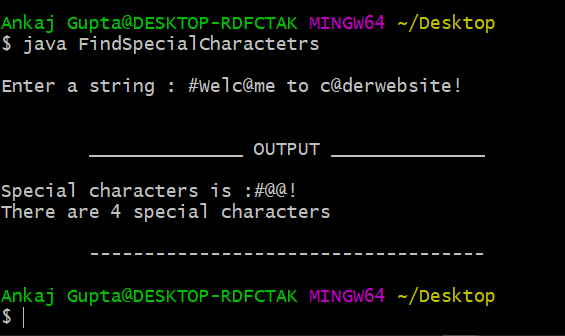
Enter a string : #Welc@me t@ c@derwebsite!

        ______________ OUTPUT ______________

Special characters is : #@@@!
There are 5 special characters
        ------------------------------------

Output 2: String without Special Characters

Enter a string : Welcome to coderwebsite 

        ______________ OUTPUT ______________

Note that : No any special characters in : {Welcome to coderwebsite}
        ------------------------------------

ASCII Method vs Regex Method

Advantages

  • • No regex knowledge required
  • • Simple and straightforward logic
  • • Easy to customize character classification
  • • More control over which characters are considered special

Disadvantages

  • • Longer code compared to regex
  • • Requires memorizing ASCII values
  • • Less flexible than regex patterns
  • • More prone to errors in range definition

Summary

This program demonstrates a manual approach to finding special characters using ASCII value checking. This method is educational and helps understand how characters are represented in computers.

For production code, the regex approach (Pattern.compile("[^a-z0-9 ]")) is generally more concise and maintainable, but this ASCII-based approach provides valuable insights into character encoding.

Recommended Posts

Java program Java programming
Read
Ankaj Gupta
March 23, 2021

How to find out nth value by using array in Java | java code examples with output

Java Essentials

Find the Nth Element in a Java Array (Safely)

Accessing a specific position in an array is a foundational task in Java, but it is easy to cause ArrayIndexOutOfBoundsException if you don't validate user input. This quick guide shows you how to request an index from the console, verify it, and safely retrieve the element.

Workflow Overview

1. Prepare data

Create or receive an array, and clarify whether indexes are zero-based (Java's default).

2. Request input

Prompt the user for the position (1-based makes more sense for humans), then translate it to a valid index.

3. Validate & respond

Check bounds, return the element if valid, or guide the user to retry.

Sample Implementation

The example below reads an integer from the console, validates it, and prints the corresponding element. It also uses a helper method to keep the main() flow clear.

import java.util.Scanner;

public class FindNthElement {

    private static final int[] VALUES = {5, 10, 15, 20, 23};

    public static void main(String[] args) {
        try (Scanner scanner = new Scanner(System.in)) {
            System.out.print("Enter the position (1-" + VALUES.length + "): ");
            int position = scanner.nextInt();

            int element = getElementAt(position);
            System.out.println("Element at position " + position + " is: " + element);
        } catch (IndexOutOfBoundsException ex) {
            System.out.println("Please enter a position between 1 and " + VALUES.length + ".");
        }
    }

    private static int getElementAt(int position) {
        int index = position - 1; // convert to zero-based index
        if (index < 0 || index >= VALUES.length) {
            throw new IndexOutOfBoundsException();
        }
        return VALUES[index];
    }
}

Example Run

Enter the position (1-5): 4
Element at position 4 is: 20

Enter the position (1-5): 9
Please enter a position between 1 and 5.

Edge Cases to Consider

Empty arrays

Guard against zero-length arrays; return a message or throw a custom exception before requesting user input.

Multiple lookups

Wrap the input logic in a loop if you want to allow several queries without restarting the program.

Different data types

Replace int with generics or wrapper classes if you plan to store complex objects.

User experience

Normalize input (e.g., trim whitespace) and communicate errors clearly to prevent confusion.

Practice Ideas

  • Reverse lookup: Ask the user for a value and return its index or a message if it's missing.
  • Random access: Populate the array with random numbers and let the program explain the difference between positions and indexes.
  • Unit tests: Use JUnit to verify getElementAt() for valid, invalid, and boundary positions.
Java program Java programming
Read
Ankaj Gupta
December 27, 2020

how to create enum in java

What is Enum in Java?

An enum is a special "data type" that is used to create our own data type like classes. It represents a group of constants (a variable that does not change).

The enum is short for "enumerations", which means "specifically listed" and the Enum data is also known as Enumerated Data Type.

Defining Java Enum

Instead of C/C++, in Java programming language enum types are more powerful. Here, we can define an enum both inside and outside the class, but not inside a method.

Rules to Define Enum in Java:

  • 1. To create an enum in Java, use the enum keyword (instead of class or interface), and separate the constants with a comma
  • 2. The enum can be defined within or outside the class because it is similar to a class. The semicolon (;) at the end of the enum constants are optional
  • 3. Because enums are constants, the names of an enum type's fields are in uppercase letters

Syntax:

enum Directions { EAST, WEST, NORTH, SOUTH; }

// OR (semicolon is optional)

enum Directions { EAST, WEST, NORTH, SOUTH }

Accessing Java Enum

You can access enum constants with the help of dot operator:

Directions myVar = Directions.NORTH;

Examples of Java Enum

Example 1: Enum Defined Inside Class

class EnumExample {
    //Defining the enum inside the class
    enum Directions {
        EAST, WEST, NORTH, SOUTH
    } //semicolon(;) is optional here
    
    public static void main(String args[]) {
        Directions myvar = Directions.NORTH;
        System.out.println(myvar);
    }
}

Output:

NORTH

Example 2: Enum Defined Outside Class

//Defining the enum outside the class
enum Directions {
    EAST, WEST, NORTH, SOUTH
}

class EnumExample {
    public static void main(String args[]) {
        Directions direction = Directions.EAST;
        System.out.println("Direction: " + direction);
    }
}

Output:

Direction: EAST

Example 3: Using Enum in Switch Statement

enum Day {
    MONDAY, TUESDAY, WEDNESDAY, THURSDAY, FRIDAY, SATURDAY, SUNDAY
}

class EnumSwitchExample {
    public static void main(String[] args) {
        Day today = Day.WEDNESDAY;
        
        switch(today) {
            case MONDAY:
                System.out.println("Start of work week");
                break;
            case FRIDAY:
                System.out.println("TGIF!");
                break;
            case SATURDAY:
            case SUNDAY:
                System.out.println("Weekend!");
                break;
            default:
                System.out.println("Midweek day");
                break;
        }
    }
}

Output:

Midweek day

Built-in Enum Methods

Java enums have several useful built-in methods:

Method Description
values() Returns all enum constants as an array
valueOf(String) Returns enum constant with the specified name
ordinal() Returns the position of enum constant (starts at 0)
name() Returns the name of enum constant

Example: Using Enum Methods

enum Colors {
    RED, GREEN, BLUE, YELLOW
}

class EnumMethodsExample {
    public static void main(String[] args) {
        // Get all enum values
        for (Colors color : Colors.values()) {
            System.out.print(color + " ");
        }
        System.out.println();
        
        // Get ordinal value
        System.out.println("GREEN position: " + Colors.GREEN.ordinal());
        
        // Get enum by name
        Colors myColor = Colors.valueOf("BLUE");
        System.out.println("Color name: " + myColor.name());
    }
}

Output:

RED GREEN BLUE YELLOW
GREEN position: 1
Color name: BLUE

Enum vs. Traditional Constants

❌ Traditional Constants

public class Directions {
    public static final int EAST = 0;
    public static final int WEST = 1;
    public static final int NORTH = 2;
    public static final int SOUTH = 3;
}
  • • No type safety
  • • Can pass any integer
  • • No namespace
  • • Hard to debug

✅ Java Enum

public enum Directions {
    EAST, WEST, NORTH, SOUTH
}
  • • Type safe
  • • Only valid values allowed
  • • Has its own namespace
  • • Built-in methods available

Key Benefits of Using Enums

Type Safety

Compile-time checking ensures only valid enum values are used

Better Code Readability

Enum names are more descriptive than magic numbers or strings

Built-in Methods

Access to values(), valueOf(), ordinal(), and name() methods

Can Add Custom Methods

Enums can have constructors, methods, and fields

Best Practices

✅ Do's

  • • Use uppercase letters for enum constants
  • • Use enums for fixed sets of constants
  • • Use enums in switch statements
  • • Prefer enums over magic numbers/strings

❌ Don'ts

  • • Don't use enums for large sets of values
  • • Don't define enums inside methods
  • • Don't use lowercase for enum constants
  • • Don't forget to use semicolon with custom methods

Summary

Java enums are powerful and type-safe alternatives to traditional constants. They provide better code organization, compile-time checking, and built-in methods for working with a fixed set of related constants.

Enums can be defined inside or outside classes, used in switch statements, and can even have custom constructors, methods, and fields. Always use uppercase letters for enum constants and prefer enums over magic numbers or strings for better code maintainability.

Java program Java programming
Read
Ankaj Gupta
August 14, 2020

Program to print numbers

Program to display numbers

In this section, you will learn how you can easily print numbers like : "0 to 50", "0 to 100", "0 to 500", "0 to 1000" and more. In this example, we print 0 to 50 number using javascript.

Let's try to create a simple program :

  ➤ Code : javascript program to print numbers;

<script>
 //Enter your number here, as often as you want to print. 
   let number = 50;
   for(let i = 0; i<=number; i++) {
        console.log(i);
    }   
<script>
Output :
Code Java program Java programming
Read
Ankaj Gupta
August 13, 2020

Program to check lead number in java

In this section, you will learn how you can easily check the lead number by using Java program.

What is Lead Number?

It is a number in which the sum of even digits is equal to the sum of the odd digits or vice-versa, Let's see:

For example : 6325

  • Sum of even number : 6 + 2 = 8

  • Sum of add number : 3 + 5 = 8

Here, the Sum of even number is equal to the sum of the odd digits, So 6325 is a lead number.

Let's try to create a simple program :

  ➤ Code : LeadNumber.java;

import java.util.*;
class LeadNumber{
   public static void main(String args[]){	
      Scanner input=new Scanner(System.in);
      System.out.print("Enter a number to check the number is Lead Number : ");        
      
      int number = input.nextInt();	// 6325 
      int r=0,odd=0,even=0;
      while(number>0)
      {
         r=number%10;	//5,2,3,6 
         if(r%2==0){
            even=even+r;	//2+6 = 8
         }
         else{
            odd=odd+r;	// 3 + 5 = 8
         }
         number = number/10;
     }
     if(odd==even)
        System.out.println("This is a Lead Number");
     else
        System.out.println("This is not a Lead Number");
   }
}
Output :

Enter a number to check the number is Lead Number : 6325

This is a Lead Number

Code Java program Java programming
Read
Ankaj Gupta
August 11, 2020

How do i create a simple program in Java?

Creating a Simple Program in java

In this section, we'll create a simple "Hello World" program of java. Let's follow the following steps:

Step 1 : Open your code editor window. Do what you like, such as Notepad, Notepad ++, NetBeans and etc. And then you have created a new file or click on the New File button on the toolbar.

Step 2 : Type the code given below in your code editor, and then save it with ".Java" extension. It is very important to save the written Java program as .java (eg : MyProgram.java).

  ➤ Example : MyProgram.java;

class MyProgram {
   public static void main(String args[]) {      
      System.out.println("Hello Java !");
   }
}			

Step 2 : Open a command prompt window and go to the directory where you saved the java program, We assume that you have created a file on the desktop.

Step 3 : To move to the desktop, type the command below and press enter.

  • cd desktop

Step 4 : Type 'javac MyProgram.java' and press enter to compile your code.

  • javac MyProgram.java

Note : If there are no errors in your code, the command prompt will take you to the next line.

Step 5 : Now finally, type 'java MyProgram' and press enter to run your program.

  • java MyProgram

Now, you will be able to see the result printed on the window.

Java program Java programming
Read
Ankaj Gupta
August 10, 2020

Simple Java program to print student details using constructor

Print Student Details Using constructor

Let's try to create a simple example in java without user input :

  ➤ Example : student.java;

class Student{	
  int roll_no;  
  String name, myclass, gender; 

   //creating a parameterized constructor 
   Student(int roll, String nam, String c) {
	roll_no = roll ; 
	name = nam;
	myclass = c;
  }  	
//method to display the values  
  void display(){
	System.out.println("My name is "+name+", I study in "+myclass+" class and my roll number is "+roll_no);
  }	 
  public static void main(String arg[]){
  //creating objects and passing values  
    Student s1 = new Student(2, "Ankaj", "12th");
    Student s2 = new Student(25, "Anmol", "9th");
    Student s3 = new Student(1, "Sudeep", "10th");	
    
   //calling method to display the values of object 
   	 s1.display();  
     s2.display();
     s3.display();  
  }	      
} 
Output :

My name is Ankaj I study in 12th class and my roll number is 2

My name is Anmol I study in 9th class and my roll number is 25

My name is Sudeep I study in 10th class and my roll number is 1

Java program Java programming
Read
Ankaj Gupta
August 09, 2020

Division of two numbers in java numbers

Java program for Division two Integers

In this section, you will learn how to divide two numbers in Java. Let's see :

1.) First program :

In this program, we specify the value of both the numbers in the program itself.

Let's try to create a simple example :

  ➤ Example : divide two integers with predefined value;

class DivideTwoNumbers 
{
   public static void main(String args[]) {      
      int x = 15, y = 10, divide;
      divide = x / y;
      
      System.out.println("Division of two numbers is : "+divide);
   }
}
                            
Explanation :

 Example 1 : explanation

    In the above program, we have created three integer variables x, y and divide, then stored (15 and 10) values in x and y.

  • Then, x divide by y using the / operator, and its result is stored in another variable divide.

  •  

  • Finally, divide is printed on the screen using System.out.println() function.

2.) Second program :

In this program, we will take two inputs from the user(entered by the user) and prints the division.

Note : Scanner class is a part of package(java.util), so we required to import this package in our Java program.

Let's try to create a simple example :

  ➤ Example : Division two integers with user input(Scanner);

import java.util.Scanner;
class DevideTwoNumbers 
{
   public static void main(String args[]) {      
      int x, y, devide;

      System.out.println("Enter two integers to calculate their Division : ");
      Scanner in = new Scanner(System.in);
     
      x = in.nextInt();
      y = in.nextInt();
      divide = x / y;
     
     System.out.println("Division of two numbers is : "+divide);
   }
}
                            
Explanation :

 Example 2 : explanation

    In the above program, we have created three integer variables x, y and divide, then create a Scanner class so that you can take input from the user for x and y.

  • Then, x divide by y using the / operator, and its result is stored in another variable divide.

  •  

  • Finally, divide is printed on the screen using System.out.println() function.

Java program Java programming
Read
Ankaj Gupta
August 06, 2020

How to run java program | compile and run java program

Run a Java Program using Command Prompt

Running a java program is very easy after JDK(Java Development Kit) installation. Following are the steps −

Step 1 : It is very important to save the written Java program as .java extension(eg : MyProgram.java).

  ➤ Example : MyProgram.java;

class MyProgram {
   public static void main(String args[]) {      
      System.out.println("Hello Java !");
   }
}			

Step 2 : Open a command prompt window and go to the directory where you saved the java program, We assume that you have created a file on the desktop.

Step 3 : To move to the desktop, type the command below and press enter.

  • cd desktop

Step 4 : Type 'javac MyProgram.java' and press enter to compile your code.

  • javac MyProgram.java

Note : If there are no errors in your code, the command prompt will take you to the next line.

Step 5 : Now finally, type 'java MyProgram' and press enter to run your program.

  • java MyProgram

Now, you will be able to see the result printed on the window.

Java program Java programming
Read
Ankaj Gupta
August 05, 2020

Multiplication of two numbers in java

Java program for Multiplication two Integers

In this section, you will learn how to easily multiply two numbers in Java. Let's see :

  • If you using int data type, then you can multiply numbers up to a limit(range of int data type).

  • If you want to multiply very large numbers, then you may use the BigInteger class in Java.

1.) First program :

In this program, we specify the value of both the numbers in the program itself.

Let's try to create a simple example :

  ➤ Example : multiply two numbers with predefined value;

class MultiplyTwoNumbers 
{
   public static void main(String args[]) {      
      int x = 15, y = 10, multiply;
      multiply = x * y;
      
      System.out.println("Multiplication of two numbers is : "+multiply);
   }
}
                            
Explanation :

 Example 1 : explanation

    In the above program, we have created three integer variables x, y and multiply, then stored (15 and 10) values in x and y.

  • Then, x and y are multiply using the * operator, and its result is stored in another variable multiply.

  •  

  • Finally, multiply is printed on the screen using System.out.println() function.

2.) Second program :

In this program, we will take two inputs from the user(entered by the user) and prints the multiply.

Note : Scanner class is a part of package(java.util), so we required to import this package in our Java program.

Let's try to create a simple example :

  ➤ Example : multiply two numbers with user input(Scanner);

import java.util.Scanner;
class MultiplyTwoNumbers 
{
   public static void main(String args[]) {      
      int x, y, multiply;

      System.out.println("Enter two integers to calculate their Multiplication : ");
      Scanner in = new Scanner(System.in);
     
      x = in.nextInt();
      y = in.nextInt();
      multiply = x * y;
     
     System.out.println("Multiplication of two numbers is : "+multiply);
   }
}
                            
Explanation :

 Example 2 : explanation

    In the above program, we have created three integer variables x, y and multiply, then create a Scanner class so that you can take input from the user for x and y.

  • Then, x and y are multiply using the * operator, and its result is stored in another variable multiply.

  •  

  • Finally, multiply is printed on the screen using System.out.println() function.

Java program Java programming
Read
Ankaj Gupta
August 03, 2020

Java program for subtraction of two number

Java program for subtraction two Integers

In this section, you will learn how to subtract two numbers in Java. Let's see :

1.) First program :

In this program, we specify the value of both the numbers in the program itself.

Let's try to create a simple example :

  ➤ Example : subtract two numbers with predefined value;

class SubtractTwoNumbers {
      public static void main(String[] args) {      
      int x = 15, y = 10, subtract;
      subtract = x - y;
      
      System.out.println("Subtraction of two numbers is : "+subtract);
   }
}
Explanation :

 Example 1 : explanation

    In the above program, we have created three integer variables x, y and subtract, then stored (15 and 10) values in x and y.

  • Then, x and y are subtract using the - operator, and its result is stored in another variable subtract.

  • Finally, subtract is printed on the screen using System.out.println() function.

2.) Second program :

In this program, we will take two inputs from the user(entered by the user) and prints the subtract.

Note : Scanner class is a part of package(java.util), so we required to import this package in our Java program.

Let's try to create a simple example :

  ➤ Example : subtract two numbers with user input(Scanner);

import java.util.Scanner;
class SubtractTwoNumbers 
{
   public static void main(String args[]) {      
      int x, y, subtract;

      System.out.println("Enter two integers to calculate their subtraction : ");
      Scanner in = new Scanner(System.in);
     
      x = in.nextInt();
      y = in.nextInt();
      subtract = x - y;
     
     System.out.println("Subtraction of two numbers is : "+subtract);
   }
}
Explanation :

 Example 2 : explanation

    In the above program, we have created three integer variables x, y and subtract, then create a Scanner class so that you can take input from the user for x and y.

  • Then, x and y are subtract using the - operator, and its result is stored in another variable subtract.

  • Finally, subtract is printed on the screen using System.out.println() function.

Java program Java programming
Read
Ankaj Gupta
August 01, 2020

Simple java program for adding two numbers

Java Program to Add Two Integers

In this section, you will learn how to easily add two numbers in Java. Let's see :

  • If you using int data type, then you can add numbers up to alimit(range of int data type).

  • If you want to add very large numbers, then you may use theBigInteger class in Java.

1.) First program :

In this program, we specify the value of both the numbers in the program itself.

Let's try to create a simple example :

  ➤ Example : Add two numbers with predefined value;

class AddTwoNumbers {
      public static void main(String[] args) {      
        int x = 10, y = 15, sum;
        sum = x + y;
      
        System.out.println("Sum of these numbers: "+sum);  
     }
}
Explanation :

 Example 1 : explanation

    In the above program, we have created three integer variables x, y and sum, then stored (10 and 15) values in x and y.

  • Then, x and y are added using the + operator, and its result is stored in another variable sum.

  • Finally, sum is printed on the screen using System.out.println() function.

2.) Second program :

In this program, we will take two inputs from the user(entered by the user) and prints the sum.

Note : Scanner class is a part of package(java.util package), so we required to import this package in our Java program.

Let's try to create a simple example :

  ➤ Example : Add two numbers with user input(Scanner);

import java.util.Scanner;
class AddTwoNumbers 
{
   public static void main(String[] args) {      
      int x, y, add;

      System.out.println("Enter two integers to calculate their sum : ");
      Scanner in = new Scanner(System.in);
     
      x = in.nextInt();
      y = in.nextInt();
      sum = x + y;
     
      System.out.println("Sum of two numbers is = " + sum);
   }
}
Explanation :

 Example 2 : explanation

    In the above program, we have created three integer variables x, y and sum, then create a Scanner class so that you can take input from the user for x and y.

  • Then, x and y are added using the + operator, and its result is stored in another variable sum.

  • Finally, sum is printed on the screen using System.out.println() function.

Java program Java programming
Read