Top Stories

Ankaj Gupta
December 18, 2022

ModuleNotFoundError: No module named 'phonenumbers'

Installing Django Phone Number Field

This article provides a comprehensive guide for installing and setting up django-phonenumber-field in your Django project. This library provides a Django model field and form fields for storing and validating phone numbers using the phonenumbers library.

Prerequisites

Before installing django-phonenumber-field, ensure you have the following installed:

  • Python 3.6 or higher
  • Django 2.2 or higher
  • pip package manager

Installation Steps

Step 1: Install django-phonenumber-field

Install the main package using pip:

pip install django-phonenumber-field

Step 2: Install django-phonenumbers

Install the phonenumbers package which provides phone number parsing and validation:

pip install django-phonenumbers

Step 3: Add to INSTALLED_APPS

Add phonenumber_field to your INSTALLED_APPS in your Django settings file:

INSTALLED_APPS = [
    'django.contrib.admin',
    'django.contrib.auth',
    'django.contrib.contenttypes',
    'django.contrib.sessions',
    'django.contrib.messages',
    'django.contrib.staticfiles',
    'phonenumber_field',  # Add this line
    'myapp',
]

Step 4: Configure Settings (Optional)

Configure the default region for phone number parsing in your settings:

# In settings.py
PHONENUMBER_DEFAULT_REGION = 'US'  # Default to US region

Note: The default region is used when parsing phone numbers that don't include a country code. Change this to match your target audience's primary region.

Usage Example

Here's how to use PhoneNumberField in your Django models:

from django.db import models
from phonenumber_field.modelfields import PhoneNumberField

class UserProfile(models.Model):
    name = models.CharField(max_length=100)
    phone_number = PhoneNumberField()  # International format
    local_phone = PhoneNumberField(region='US')  # US format
    
    def __str__(self):
        return self.name

Using in Forms

The library also provides form fields for easy integration:

from django import forms
from phonenumber_field.formfields import PhoneNumberField

class UserProfileForm(forms.Form):
    name = forms.CharField(max_length=100)
    phone_number = PhoneNumberField()
    
    def clean_phone_number(self):
        phone_number = self.cleaned_data['phone_number']
        # Automatic validation happens here
        return phone_number

Key Features

International Format

Stores phone numbers in E.164 international format

Automatic Validation

Validates phone numbers during form submission

Region Support

Supports different regions and formats

Database Efficient

Uses CharField with max_length=128 in database

Common Installation Commands

Quick Install: Use these commands if you need to install both packages together:

pip install django-phonenumber-field django-phonenumbers

Summary

django-phonenumber-field provides a robust solution for handling phone numbers in Django applications. It offers international format support, automatic validation, and seamless integration with Django models and forms.

After installation, simply add phonenumber_field to your INSTALLED_APPS and start using PhoneNumberField in your models.

django Python programming
Read
How do I get the Yelp Fusion API Key | How to get Yelp API Key
Ankaj Gupta
October 10, 2021

How do I get the Yelp Fusion API Key | How to get Yelp API Key

# In this article you will learn, How to create a new yelp account and How do you get the Yelp Fusion API Key.

What is Yelp API?

The Yelp Fusion API allows users to get local content and user reviews from millions of businesses, such as the restaurant, hospitality and service industries in 32 countries. Yelp content may be used for app and website development purposes.

# How to Create a Yelp Account

Step 1: Go-to yelp developers portal

To continue with Yelp API, First you need to visit the Yelp developers portal. Yelp developers portal

Yelp developers portal

Step 2: Create a Yelp Account.

You can continue to work with the Yelp service through a Facebook, Google, or Apple account. Another option is to sign up with your email address.

Note: You have to verify that you are not a robot by filling the recaptcha.

Now your account is successfully created.

Step 3: Verify email id

In this case you will receive a confirmation email - don't forget to follow the link in it to verify your account.

yelp verify email

# How do I get the Yelp API Key

Step 1: Get started with Fusion API

Once you are logged into the Yelp Developers service, first scroll to the bottom of the page and hit the Explore Yelp Fusion button.

Explore Yelp Fusion

Step 2: Create an App

First, log in to the Developers Portal with your existing Yelp account or create a new one.

How do I get the Yelp Fusion API Key | How to get Yelp API Key

Create your first Yelp app to receive your personal Yelp fusion API Key and fill in the required fields in the form, agree to the Yelp API Terms of Use and performance requirements. Then prove you're a human, and press Create New App button.

yelp api form | Create the Yelp App | Yelp Fusion API Key

Step 3: Get your Client ID and API Key.

After submitting the form, you will get your Client ID and API Key. Save them to start working with your app.

Get yelp Client ID and API Key | Yelp Fusion API Key

Note: Remember to keep your personal Yelp API Key with yourself! This is the credential for your calls to Yelp's API and must be used only by you.

API Yelp Fusion
Read
How to fetch single column from database in Django | Django values_list querysets
Ankaj Gupta
October 02, 2021

How to fetch single column from database in Django | Django values_list querysets

How to Fetch Single or Column Data from Database in Django ORM

In Django, with the help of the values_list() method, you can fetch single or multiple column data from your database efficiently.

Django values_list querysets

Introduction

The values_list() method is similar to values(), except that instead of returning dictionaries, it returns tuples when iterated over. Each tuple contains the value from the respective field passed into the values_list() call.

Example Model

Your Posts model is like this:

class Posts(models.Model):
    title = models.CharField(max_length=100)
    description = models.TextField(max_length=155)
    
    class Meta:
        verbose_name_plural = "Posts"

    def __str__(self):
        return self.title

Basic Usage

# Fetch single column data
Posts.objects.values_list('id',)

# Fetch more than one column data
Posts.objects.values_list('id', 'title',)

# You can also fetch in order_by
Posts.objects.values_list('id', 'title',).order_by('?')

Note: You can also pass in a flat parameter if you only pass in a single field. It will return true/false values.

Understanding flat=True

If flat=True, the returned results are single values, rather than one-tuples. Let's look at an example to make the difference clear:

# Without flat=True
Posts.objects.values_list('id')
# Output: [(1,), (2,), (3,), ...]

# With flat=True
Posts.objects.values_list('id', flat=True)
# Output: [1, 2, 3, ...]

Important Limitation

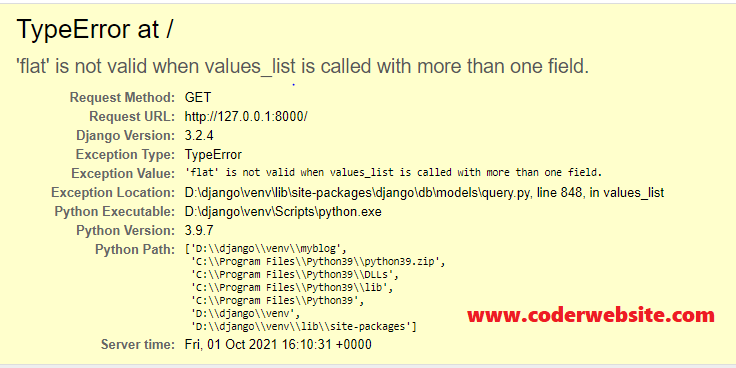
values_list raises an error if you try to pass in flat=True when there is more than one field.

# This will raise an error
Posts.objects.values_list('id', 'title', flat=True)
Django values_list error

Important Points

  • All Fields: If you don't pass any values to values_list(), it will return all the fields in the model, in the order they were declared.
  • QuerySet Behavior: values_list method returns a ValuesListQuerySet that behaves like a list. If you require an actual Python list object, you can call list() on it.
  • Getting Specific Values: A common requirement is to get the specific field value of a certain model instance. Use values_list() and then call the get() method.

Example of getting a specific value:

# Code
Posts.objects.values_list('title', flat=True).get(pk=1)

# Output
'First entry'

values_list() vs values()

Feature values_list() values()
Return Type Tuples Dictionaries
Memory Usage Lower (more efficient) Higher
Best For Getting specific field values Getting labeled data

Summary

values_list() is a powerful and efficient method for fetching specific columns from your database. Use it when you need specific field values, especially with flat=True for single fields to get clean, flat lists of values.

Remember: flat=True only works with single fields, and calling values_list() without arguments returns all fields in declaration order.

Recommended Posts

django Django QuerySet
Read
Java program to find and  print all special characters with their positions in a string
Ankaj Gupta
July 18, 2021

Java program to find and print all special characters with their positions in a string

Program to Find Special Characters in a String

In this section, you will learn how to find special characters from a string in Java along with counting the total number of special characters with their positions in a given string.

Java program to find special characters in a string

Overview

This Java program demonstrates how to use regular expressions to find and count special characters in a string. Special characters are any characters that are not letters (a-z, A-Z), numbers (0-9), or spaces.

Complete Program

import java.util.regex.Matcher;
import java.util.regex.Pattern;
import java.util.Scanner;

class FindSpecialCharacters {
    public static void main(String args[]) {
        Scanner input = new Scanner(System.in);
        String str;

        System.out.print("\nEnter a string : ");
        str = input.nextLine();

        Pattern string_patterns = Pattern.compile("[^a-z0-9 ]", Pattern.CASE_INSENSITIVE);
        Matcher string_matcher = string_patterns.matcher(str);

        System.out.println("\n\n\t______________ OUTPUT ______________");
        System.out.println("\nYour string is : "+str);

        int count = 0;
        while(string_matcher.find()) {
            count = count + 1;
            System.out.println("\tposition "+string_matcher.start() +": "+ str.charAt(string_matcher.start()));
        }
        System.out.println("\nThere are "+count+" special characters");
        System.out.println("\n\t------------------------------------");
    }
}

Code Explanation

1. Pattern Definition

Pattern.compile("[^a-z0-9 ]", Pattern.CASE_INSENSITIVE)

This regex pattern [^a-z0-9 ] matches any character that is NOT a letter (a-z), number (0-9), or space.

2. Matcher Usage

Matcher string_matcher = string_patterns.matcher(str)

The matcher is created to find all occurrences of the pattern in the input string.

3. Finding Special Characters

while(string_matcher.find()) {
    count = count + 1;
    System.out.println("\tposition "+string_matcher.start() +": "+ str.charAt(string_matcher.start()));
}

The find() method returns true each time a match is found, and start() returns the position of the match.

Key Concepts

Regex Pattern

[^a-z0-9 ] is a negated character class that matches anything except letters, digits, and spaces.

Matcher.find()

Returns true if the pattern is found in the string and advances the matcher to the next match.

Matcher.start()

Returns the start position of the previous match in the string.

Pattern.CASE_INSENSITIVE

Flag to make pattern matching case-insensitive, covering both uppercase and lowercase letters.

Sample Outputs

Output 1: String with Special Characters

Enter a string : `Welcome to #coderwebsite && "j@v@" is @m@zing programming l@ngu@ge`!

        ______________ OUTPUT ______________

Your string is : `Welcome to #coderwebsite && "j@v@" is @m@zing programming l@ngu@ge`!
	position 0: `
	position 12: #
	position 26: &
	position 27: &
	position 29: "
	position 31: @
	position 33: @
	position 34: "
	position 39: @
	position 41: @
	position 60: @
	position 64: @
	position 67: `
	position 68: !
There are 14 special characters
        ------------------------------------

Output 2: String without Special Characters

Enter a string : Welcome to coderwebsite 

        ______________ OUTPUT ______________

Your string is : Welcome to coderwebsite 
There are 0 special characters
        ------------------------------------

Use Cases

  • Data Validation: Check if user input contains invalid special characters
  • Password Validation: Ensure passwords contain or don't contain certain characters
  • Text Sanitization: Identify and remove special characters from text
  • Security Checks: Detect potentially malicious input or SQL injection attempts

Summary

This program effectively demonstrates how to use Java's regex capabilities to find and count special characters in a string. The key is using a negated character class [^a-z0-9 ] to match anything that isn't a letter, digit, or space.

By combining Pattern and Matcher classes, you can efficiently process strings and extract specific information based on complex patterns.

Recommended Posts

Java program Java programming
Read
How to find special characters in a string in java | Java program to check and get special characters in a String
Ankaj Gupta
July 18, 2021

How to find special characters in a string in java | Java program to check and get special characters in a String

Program to Find Special Characters in a String (Without Regex)

In this section, you will learn how to find special characters from a string in Java along with counting the total number of special characters in a given string, without using regular expressions. This approach uses ASCII value checking.

Java program to find special characters in a string

Overview

This Java program demonstrates an alternative approach to finding special characters in a string by checking ASCII values of each character. This method is useful when you want to avoid regex or need more control over character classification.

Complete Program

import java.util.Scanner;

class FindSpecialCharacters {
    public static void main(String args[]) {
        Scanner input = new Scanner(System.in);
        String str;
        char find_special_charactetr[] = new char[1000];

        System.out.print("\nEnter a string :");
        str = input.nextLine();

        int p, special_charactetr = 0;
        char a[] = str.toCharArray();
        int len = a.length;

        for (int i = 0; i < len; i++) {
            p = a[i];
            if (p >= 65 && p <= 90 || p >= 97 && p <= 122 || p == 32 || p >= 48 && p <= 57) {
                continue;
            } else {
                find_special_charactetr[special_charactetr] = a[i];
                special_charactetr++;
            }
        }

        if (special_charactetr > 0) {
            System.out.println("\n\n\t______________ OUTPUT ______________");
            System.out.println("\nSpecial characters is :"+String.valueOf(find_special_charactetr));
            System.out.println("There are "+special_charactetr+" special characters");
            System.out.println("\n\t------------------------------------");
        } else {
            System.out.println("\n\n\t______________ OUTPUT ______________");
            System.out.println("\n Note that : No any special characters in : {"+str+"}");
            System.out.println("\n\t------------------------------------");
        }
    }
}

Code Explanation

1. ASCII Value Check

if (p >= 65 && p <= 90 || p >= 97 && p <= 122 || p == 32 || p >= 48 && p <= 57)

This condition checks if a character is:

  • 65-90: Uppercase letters (A-Z)
  • 97-122: Lowercase letters (a-z)
  • 32: Space character
  • 48-57: Digits (0-9)

If the character doesn't match any of these ranges, it's considered a special character.

2. Character Array Conversion

char a[] = str.toCharArray();

Converts the string into a character array for easy iteration and ASCII value checking.

3. Special Character Collection

else {
    find_special_charactetr[special_charactetr] = a[i];
    special_charactetr++;
}

When a special character is found, it's stored in the special character array and the counter is incremented.

ASCII Value Reference

Character Type ASCII Range Example Characters
Uppercase Letters 65-90 A, B, C, ..., Z
Lowercase Letters 97-122 a, b, c, ..., z
Digits 48-57 0, 1, 2, ..., 9
Space 32 " "

Sample Outputs

Output 1: String with Special Characters

Enter a string : #Welc@me t@ c@derwebsite!

        ______________ OUTPUT ______________

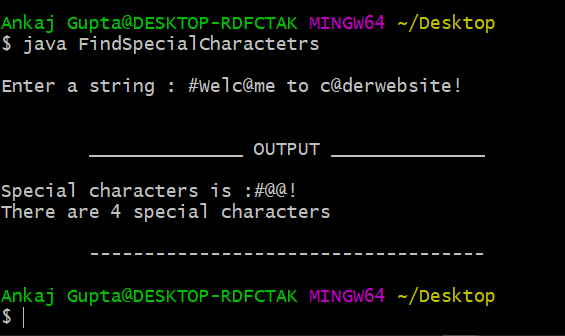
Special characters is : #@@@!
There are 5 special characters
        ------------------------------------

Output 2: String without Special Characters

Enter a string : Welcome to coderwebsite 

        ______________ OUTPUT ______________

Note that : No any special characters in : {Welcome to coderwebsite}
        ------------------------------------

ASCII Method vs Regex Method

Advantages

  • • No regex knowledge required
  • • Simple and straightforward logic
  • • Easy to customize character classification
  • • More control over which characters are considered special

Disadvantages

  • • Longer code compared to regex
  • • Requires memorizing ASCII values
  • • Less flexible than regex patterns
  • • More prone to errors in range definition

Summary

This program demonstrates a manual approach to finding special characters using ASCII value checking. This method is educational and helps understand how characters are represented in computers.

For production code, the regex approach (Pattern.compile("[^a-z0-9 ]")) is generally more concise and maintainable, but this ASCII-based approach provides valuable insights into character encoding.

Recommended Posts

Java program Java programming
Read